
IP Camera Viewer
kapron-apHouse & Home
3.9169.00 Reviews
- Version
- 11.1.7
- Installs
- 1.00M
- Age Rating
- Everyone
Screenshots

Our Review of IP Camera Viewer
 Analysis by Appyee
I see IP Camera Viewer as a practical companion for someone who already owns a compatible home camera and wants to check its feed from a phone. Its appeal is straightforward rather than flashy: it is a free House & Home app from kapron-ap, with a 3.7 average from around 7,600 ratings and more than a million installs. That reach suggests plenty of people have tried it, but the modest average is also a reminder that camera apps can be very dependent on the hardware and setup they are paired with.
Where a camera viewer earns its place
The most useful role for this kind of app is quick access, not replacing a complete security system. If you are away from home and want to check whether a delivery is still by the door, or you want to see whether a room is empty before letting a pet roam, opening a live camera view on your phone can be more convenient than finding a computer or signing into a separate monitoring service.
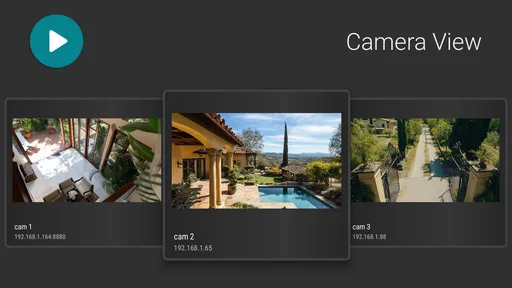
For a small home setup, having several camera feeds available in one place can also make routine checks less fussy. I would use that layout to scan a front entrance and a shared living area, then open one feed for a closer look if something catches my attention. The practical benefit is fewer app switches; the trade-off is that a crowded view can make details harder to notice, so I would not treat a multi-camera screen as a substitute for checking a specific feed carefully.
A useful habit is to give each camera a clear, recognizable name as you add it. Names based on where the camera points are more helpful than labels based on the device itself, especially when you are checking quickly on a small screen. I would also test each feed from the exact places I expect to use it, such as home Wi-Fi and mobile data, before relying on it during a trip. That simple rehearsal can reveal a connection or camera-configuration problem while you are still nearby to fix it.
What to check before depending on it
The app’s usefulness starts with whether it can communicate with your particular camera. “IP camera” covers many devices and configurations, so I would not assume that every camera will connect just because it uses Wi-Fi or has a live feed in its own app. Before building a monitoring routine around this viewer, check the camera’s connection details and try adding one device first. If the camera is not recognized or the feed is unreliable, the manufacturer’s own app may be the more dependable option.
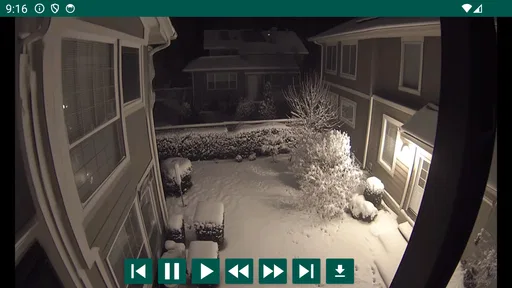
Playback matters just as much as a live view when you are trying to understand what happened while you were out. A sensible workflow is to check the live image first, then use playback to review a relevant moment rather than leaving footage running while you search. Keep in mind that playback is only useful when the camera and recording setup have actually retained the footage you need. I would make a short test recording and review it before trusting the arrangement for an important event.
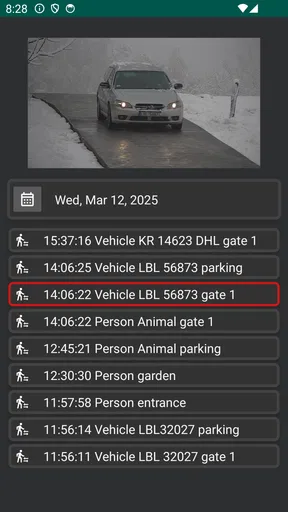
Notifications deserve a little tuning, too. A movement alert can be helpful when you want to know that something has changed, but a busy scene may produce interruptions that are not worth acting on. I would start with alerts for the camera or area I care about most, then adjust the setup if the notifications are too frequent. That keeps a useful warning from becoming background noise that I eventually ignore.
There is an important distinction between viewing a camera and having a complete security service. A phone viewer can make it easier to see a feed, but it does not automatically solve camera placement, network reliability, storage, or what you will do after an alert. If you need a coordinated alarm system, professional monitoring, or a very specific recording history, compare those requirements with the equipment and service you already use rather than assuming a viewer app covers them all.
Getting Started with IP Camera Viewer
First things first, setting up the IP Camera Viewer is a breeze. You don’t need to be a tech wizard to get it running. Just download the app from your favorite app store, install it, and you’re good to go. What I found really handy is how the app guides you through the setup process. It's like having a friendly tech-savvy buddy by your side.
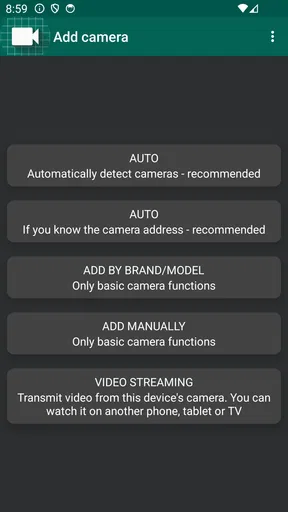
Once you have the app installed, you can start adding your cameras. The app supports a wide range of IP cameras, which is great if you already have some set up. It’s as simple as entering your camera’s details, and voila! You can see live footage right from your phone.
Features That Make Life Easier
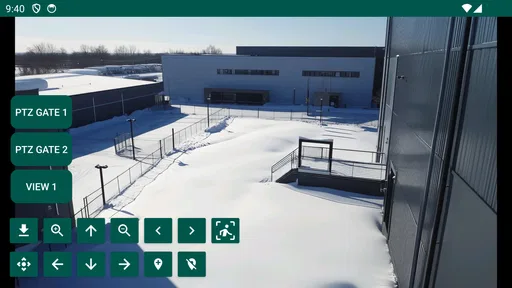
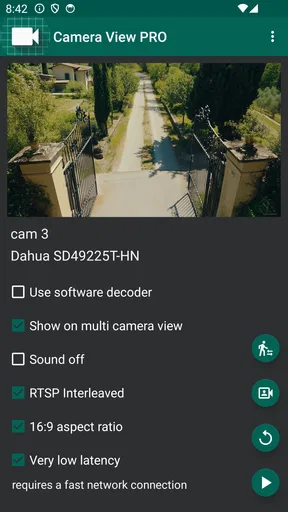
Okay, let’s talk about features because this app is packed with them. You can view live streams from multiple cameras at once, which is a massive plus if you have more than one area to monitor. The interface is smooth, and switching between cameras is as easy as pie.
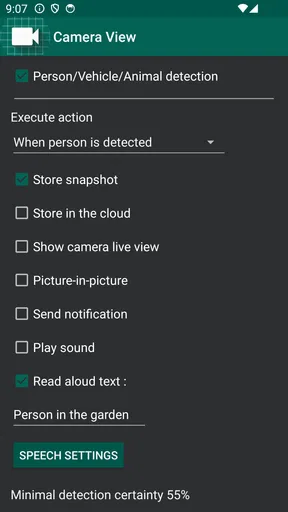
One of my favorite features is the motion detection alerts. Whenever the app detects movement, it sends a notification right to your phone. It’s perfect for those times when you need to step out but still want to keep an eye on things. No more worrying about missing any action!
Another cool feature is the ability to record footage. You can schedule recordings or start them manually, which gives you flexibility in how you monitor your spaces. Plus, you can save recordings directly to your device or cloud storage, so you always have access to them when needed.
User Experience and Design
The design of IP Camera Viewer is sleek and user-friendly. Navigating through the app is intuitive, which means you won’t find yourself lost in a sea of menus. Everything is laid out clearly, making it easy to find exactly what you need.
One thing I really appreciate is the app’s customization options. You can tweak how notifications are sent, adjust camera settings, and even personalize the layout of your camera feeds. It’s these little touches that make using the app a pleasant experience.
Choosing it over the usual alternatives
Compared with using each camera maker’s own app, a shared viewer can be appealing when your routine involves checking more than one feed. You get one place to look instead of remembering which app belongs to which device. But a manufacturer’s app may still be the safer choice if it offers the most direct setup for your camera or has controls you rely on. I would choose convenience only after confirming that the important feeds and playback work consistently.
Compared with a dedicated home-security subscription, a viewer is a narrower tool. It suits someone who already has cameras and mainly wants to look in, while a paid service may be a better fit for people who need a more managed system. The app is free to install, though it offers in-app purchases ranging from $1.99 to $15.99 per item. I would check the purchase choices in the app before spending, and decide whether the features they unlock solve a real need rather than paying simply because they are available.
Who should use it—and who should look elsewhere
I would recommend trying it if you have an IP camera already in place, prefer checking feeds on your phone, and are comfortable entering camera connection details. It can make sense for renters who want a quick view of a room, homeowners checking an entrance, or small-workspace users who need occasional visual checks without sitting at a monitor. The app is rated for Everyone, and its current version is 10.6.7; it runs on Android 5.0 and newer.
I would be more cautious if you are buying your first camera and expect the app to guide every hardware choice, or if you need a polished, fully managed security package with reliable support across a particular camera brand. In those cases, I would first compare the camera maker’s own software and the security options built around the hardware. This viewer is most convincing when it fits equipment you already know works.
For an everyday example, imagine leaving home for work and wanting to check the entryway after a delivery notification from another service. I would open the relevant feed, verify whether the parcel is there, and close the app rather than keeping a live stream open all day. If something looked unusual, I would review the camera’s available playback and confirm that recordings were saved as expected. This approach uses the app as a convenient check-in tool without mistaking it for a complete response plan.
Wrapping It Up
In a nutshell, the IP Camera Viewer app is a solid choice for anyone looking to amp up their security game. It’s easy to set up, packed with useful features, and offers a seamless user experience. Whether you’re a security pro or just someone who wants to keep an eye on things, this app is worth checking out.
If you’re interested in giving it a spin, head over to your app store and download it today. Trust me, it’s a decision you won’t regret!
Privacy and Permissions
See what permissions an app requests and how it handles your data.
- Camera
- take pictures and videos
- Microphone
- record audio
- Wi-Fi connection information
- view Wi-Fi connections
- Other
- view network connections, allow Wi-Fi Multicast reception, full network access, run at startup, draw over other apps, prevent device from sleeping, Google Play license check
Verdict
Strengths of IP Camera Viewer
- User-friendly interface for easy navigation.
- Supports multiple camera brands and models.
- Real-time streaming with minimal lag.
- Customizable layouts for personalized viewing.
- Remote access from anywhere via the app.
Limitations of IP Camera Viewer
- Limited features in the free version.
- Occasional connectivity issues.
- High battery usage on mobile devices.
- Ads can be intrusive during use.
- Requires stable internet for optimal performance.
Similar Picks in This Category
View All
Universal TV Remote Control
CodeMatics Media Solutions3.9

AlfredCamera Home Security app
Alfred Systems Inc.4.7

Planner 5D: AI Home Design
Planner 5D4.5

Universal Tv Remote-Cast to TV
One Music Player4.1

Zillow: Homes for Sale & Rent
Zillow Group4.8

99acres Buy/Rent/Sell Property
infoedge.com4.3
Frequently Asked Questions
What platforms does IP Camera Viewer support?
IP Camera Viewer is compatible with both Android and iOS devices, ensuring a seamless experience across popular mobile platforms. Whether you're using a smartphone or a tablet, you can easily access and manage your IP cameras through the app, providing flexibility for users with different types of devices.
How many cameras can I connect to the IP Camera Viewer?
The IP Camera Viewer app supports multiple camera connections, allowing you to monitor up to four live video feeds simultaneously. This feature is particularly useful for users who need to keep an eye on various locations at once, such as home security or business surveillance, all from a single interface.
Is the IP Camera Viewer app secure to use?
Yes, the IP Camera Viewer app places a strong emphasis on security. It uses encrypted connections to ensure that your video feeds and data are protected from unauthorized access. Additionally, the app offers password protection and other security features to provide peace of mind when monitoring your cameras remotely.
Can I record video from my IP cameras using the app?
While the primary function of IP Camera Viewer is to provide real-time video streaming, it also includes options for recording video feeds. Users can record video clips directly within the app and save them to their device, allowing for easy access and review of important footage at a later time.
Does the IP Camera Viewer app require a subscription?
The IP Camera Viewer app offers a free version with basic features, but it may also provide premium features through in-app purchases or a subscription model. Users who require advanced functionalities, such as additional camera connections or extended recording options, can explore these paid options to enhance their experience.
